Zen Mode + Rules Engine
Automated categorization rules that learn from your habits. Set it and forget it.
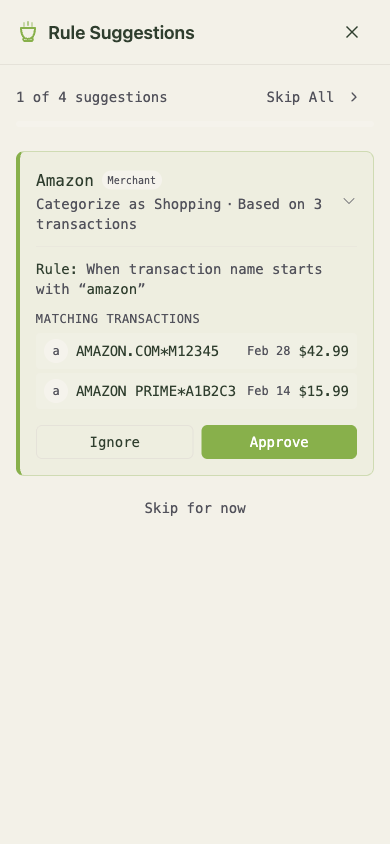
Categorizing transactions is the core of envelope budgeting — but it shouldn't be something you do manually forever. That's what the rules engine is for.
Automated categorization rules
Create rules that match transactions by description pattern. Once a rule is set, every matching transaction gets categorized automatically as it syncs.
Examples:
"Whole Foods"→ Groceries"Netflix"→ Subscriptions"Transfer from Savings"→ Ignore"Starbucks"→ Coffee + tag with "daily"
Create rules from anywhere
- From the transaction list — right-click or tap the context menu on any transaction to create a rule based on its merchant
- From Zen Mode — as you categorize, matcha money watches your patterns and suggests rules. If you've categorized the last five "Starbucks" transactions as "Coffee," it'll suggest a rule to handle the rest automatically.
- From Settings — manage all your rules in one place
Bulk apply
When you create a new rule, you can apply it retroactively to all existing matching transactions. No need to go back and re-categorize.
Available via API and MCP
Rules are fully accessible through the REST API and MCP tools. Your AI assistant can create, update, and manage rules.
Example MCP call:
{
  "tool": "manage_rules",
  "arguments": {
    "if_description_contains": "Whole Foods",
    "set_category": "Groceries",
    "add_tags": ["weekly-shop"]
  }
}
This creates a rule that automatically categorizes any transaction with "Whole Foods" in the description as Groceries and tags it. You can also pass a rule_id to update an existing rule, or "delete": true to remove one.
Try asking your AI assistant: "Create a rule that categorizes all Amazon transactions as Shopping and tags them with 'online'."
Chris Hsu